Communication.
- Mylo Sayles
- Mar 6, 2023
- 12 min read

Updated: Mar 9, 2023
(Project 1.8)
My Work.
Below are examples of some of my projects. I speak about the types of communication used within them and I also speak about my experience with both the project itself and the software I used when creating my final outcome.

Communication can be split into the three things: Visual, Verbal and Written. I have used all of these methods throughout my time on this course. Each project contains at least one of the following:
Photography.
Graphic Design.
Illustration.
Video.
Audio.
Photography.
Photography is a form of media that contains only visual communication, photography however can be edited and combined with illustrations and design so that it means more visually or it can feature text so that there is also written communication involved too.

In my first photography based project [1.5] I used only visual communication. In this project we all went out and took photos using techniques such as 'The Rule Of Thirds' in order to position the subjects of the pictures in a way that means the human eye will be automatically drawn to the right part of the image. You can also edit photos in a way where some things are more of a focus to an audience - this can be done by adjusting different settings such as brightness, sharpness, contrast, warmth, saturation and more. In addition to this, if you have any knowledge on colour theory you could also incorporate this into your editing when you are adjusting things that relate to the colours of an image.
For this project we used Adobe Lightroom which I found quite easy to pick up as I have edited photos in a similar way before and therefore I knew what most of the tools did and knew how to create an effective edit.
With another photography project [4.2] that we did I used both visual and written communication.
We were tasked to create a magazine cover with our own photography and then edit, develop and design it in Adobe Photoshop and Illustrator. The photo and the edit contains visual communication: the use of colour - or lack of - the way the photo is taken [use of angles, lighting etc.] and the way the model is positioned. The positioning and colour of the text is also visual communication as I have purposely positioned, sized and coloured it in a way that draws the eyes to the right places. I used written communication when it came to editing and adding text to the photo to make it into the style of a magazine cover. Examples of this include the logo text, the title and the information featured on the cover. I think that the visual and written communication used on this project was effective and think that from feedback I have received that the eyes are drawn to the correct places.
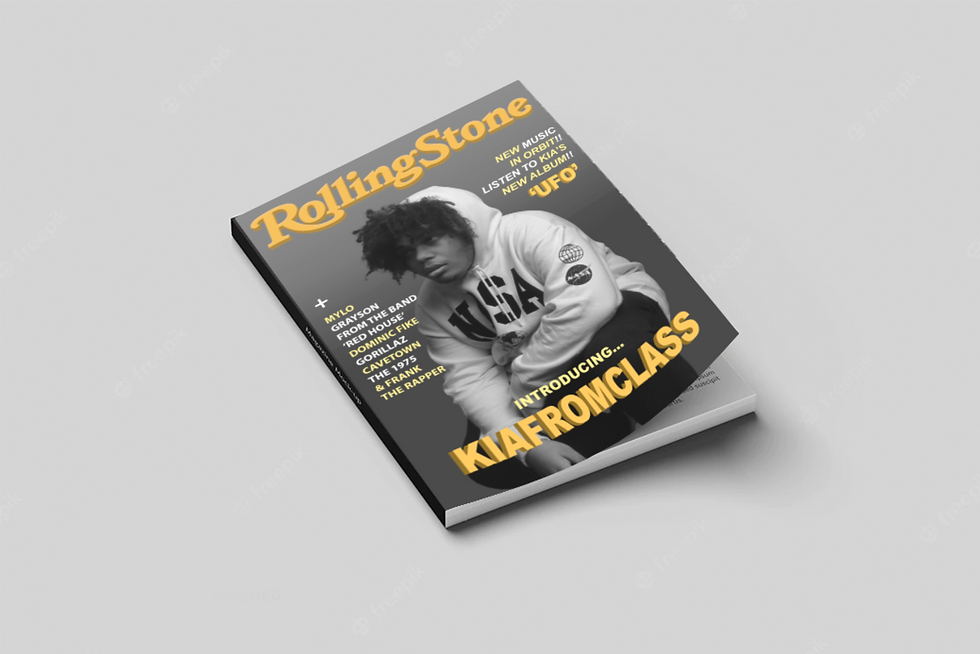
One thing I did struggle with on this project was the use of Adobe Photoshop. At this point, Photoshop was relatively new to me therefore when editing my photos I struggled a bit with remembering what all of the different tools do and ended up adding on most of my text in Illustrator as this was something I was more used to - I still do struggle with Photoshop sometimes so I think this is something I should definitely find time to improve on.
Graphic Design.
Graphic Design is also something that uses predominantly visual communication. It can incorporate lots of different things such as illustration, text and typography, photography and more - it basically just implies 'visual content' however it can be sometimes made into video or animation and more. Sometimes these videos and animations can feature sound which would be classed as verbal communication.
There are many examples of uses of graphic design in my projects and I have even sometimes done it as something extra to add to my projects to make them more effective as it is something that I enjoy quite a lot.
One example of a time I used graphic design was when I was tasked to design a logo based on a random animal. The animal I was given was a koala and I immediately began developing my ideas. After creating a sketch and eventually simplifying and deciding on a colour scheme, I finished creating my final logo. The logo consists of two simple colours which are associated with the animal and I ended up choosing: relatively pastel, soft colours. This is because when researching I found that these things are also typically associated with koalas in branding - take 'Crushelle' for example, their branding focuses on how soft their products are and they use a koala as their main mascot. This is visual communication as the design needs to fit its brand and communicate to the audience what type of thing it is going to be by looking at it.
To help me further solidify my ideas, I decided to create some example products and mockups around what the logo could represent. I decided to go down the relaxation approach as typically koalas are associated with being calm, passive and relaxed. For this reason, I came up with things such as: Teas, Incense, Essential Oils, Shampoos - all things commonly used for relaxation. I ended up being really happy with the mockup designs I created too! Here is an example featured below of my logo on my favourite mockup.

I think the visual communication in this design was of good quality as I think that it possesses the style of many similar types of shampoo. I like the colours as they fit with my overall idea of being green and eco friendly and also fit together well. However, I do think that the written communication could have been improved. It is not overly clear that the product is eco friendly as it does not say that or have any symbol on it to say so either, I think that if I had another chance and more time to improve the communication of this design I would create a label for the back of the bottle and probably add more information to the front.
To create these designs I used the Adobe Illustrator software. I'd say that especially, at the point in time when I was relatively new to most of the Adobe software, Illustrator was the one I was the most comfortable with out of them all.
Illustration.
illustration uses visual communication in many ways. Drawings contain and are made up of different lines, colour, shapes and more. Different types of line, colour and shape can mean, symbolise and communicate different things such as emotion. Illustration is something I have been passionate about for as long as I can remember so these projects are some of my favourite ones.
An example of an illustration project I have done could be project [1.4]

In this project we were told to incorporate colour theory into an illustration. This project in many ways was a form of visual communication. After doing research on different colour schemes, harmonies and contrasting colours I decided on the type of colour scheme I wanted to use for my illustration.
I used a triadic colour scheme of red, yellow and blue as these colours fit the vibe of my illustration and after doing more digging on the person/character I was going to draw I found that this colour scheme fit perfectly when it came to the symbolism side of things too [I chose to draw the character Jesse Pinkman from Breaking Bad and the show actually has its own colour symbolism theory!]. I was really happy with my result as I got to explore various ways of visual communication - making the piece stand out, and harmonise well with colour theory while also creating something that could possibly mean something to people that have watched the show 'Breaking Bad'.
To create this I used the software Adobe Illustrator, as can be seen, my skills in illustrator have been developing by this point. I now really enjoy using the software as it is something I can always pick up fast even when I haven't used it in a while. One thing however is that I have been using my preferred software 'Procreate' for much more time than I have been using illustrator and when using Procreate I feel like I have much more line control when it comes to finer detail so for this illustration I used both Procreate and Adobe Illustrator.
Video.
The video projects we were assigned were probably one of the ones that consistently contained the most forms of communication every time - visual communication and verbal communication. The videos we created contained visual footage and audio. We learned a lot about editing and an effective form of visual and verbal communication that I found in video and film could be within the J and L cuts I created when editing a hospital scene for a project [4.3]. The J and L cuts communicate to the audience extremely well because they could show characters emotions and reactions to what other characters are saying as one characters audio would play over another's reaction it is extremely effective as it lets the audience know what the characters are feeling and expresses the overall vibe and feeling of a scene.
Also, when preparing and planning for my hospital scene, I created a storyboard in order to visually communicate my idea. We had the option of creating a shot list/script or a storyboard and even though many people chose to make a list or script and therefore communicate with words, I knew that making a storyboard would be most helpful for me. I also colour coded my storyboard and I think that this ended up being a brilliant form of visual communication considering the positive feedback I received from my tutor.

For this project I used the software Premiere Pro to edit. The hospital scene part of this project was set up to help us practice with the software creating J and L cuts so we could move on to the second part of the project which was editing a music video. I originally panicked at the fact that we were going to have to use Premiere again as it was only something I had used once or twice previously and wasn't completely comfortable with it, however I managed to pick it back up again pretty quickly and really enjoyed the project.
Feel free to visit my Projects Page and look for Project 4.3 for more insight!
Audio.
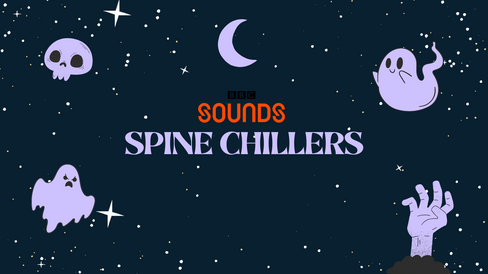
These types of projects mostly contained verbal communication, for example, we were tasked to create podcasts on Project 1.7 and also Project 6 I think that the verbal communication and overall clarity of the conversation topics in these podcasts could have been improved as due to my limited confidence in this sort of thing - especially in Project 1.7 which was the first time I'd done anything like this. I do think however due to feedback I received from Project 4.1 that when it comes to making voiceovers and pitching products my communication is much better and I am able to explain things better, especially when I have some notes in front of me. In addition to this I have also used verbal communication in a different way. In Project 6 I was tasked to edit someone else's voice to create something similar to a BBC Sounds horror podcast. I ended up learning how to add voice effects and make voices sound scarier, this communicates well to an audience because they will register certain audio ques etc. as threatening. For this project I also designed some visualisers for my podcast. These use visual communication. I think that the colours and elements used and included communicates the whole vibe of the podcast well.
In all of these audio projects I used a mixture of Premiere Pro and Audition. I found Premiere much easier than Audition but I think this was just because I had used Premiere a whole lot more and only used Audition briefly to edit some audio to in order to include it on my website.


Evaluations and Presentations.
Most evaluations and communication done on my website when it comes to evaluation is in the form of words and can be found within the evaluations etc. on my Projects Pages or in my Blogs. These are all forms of written communication.
When having to create a pitch for Project 4.1 however, I used visual, verbal and written communication to pitch the product I designed. I used my microphone to create a voiceover to a PowerPoint that I created. The PowerPoint featured both text [written communication] and images [visual communication]. I found that this was quite effective and received positive feedback from my tutor, who set the assignment, about how clear and understandable the pitch ended up being all together. This made me feel really positive and gave me a confidence boost as originally when making the audio recording of my pitch I was extremely nervous and experienced a lot of anxiety around the whole thing. For these reasons I think maybe in the future, in order to mix things up I may use this style more to explain my projects.
As for my usual written communication in my evaluations, explanations and blogs, I think that there is always room for improvement and I think that sometimes my writing can be a bit too much or too wordy - for example, this blog had a minimum of 500 words. I'm pretty sure I passed that long ago - however I do think that I am often pretty good at evaluation and explaining my choices, especially when it comes to things that I have done that I am passionate about.

Overall Conclusion.
Software.
Overall, I feel that this course so far has opened me up to so many additional methods of creating and communicating. It has gotten me used to different software and while I still feel that I am most comfortable using drawing and illustration software, there are many new skills I have obtained from using things such as Adobe Premiere Pro, Photoshop, Lightroom and more. Below, I have created a list of the software I found easiest to hardest to use:
Easiest
Illustrator
Lightroom
Premiere Pro
Audition
Photoshop
Hardest
The reasons on why these are arranged this way vary however a lot of it just comes down to what I am used to and interested in so therefore what I can easily recognise. I think that with more practice I could get used to anything and I have actually unexpectedly really enjoyed working with Premiere Pro. I was even considering on perhaps using Premiere for some parts of my Final Major Project.
Communication Methods - A Summary.
Altogether, I feel like all methods of communication have been extremely useful to me while I have been on the course and working through my projects. The method that I find easiest and that comes more natural to me though is probably visual. I feel that I am a very visual person being someone who draws and I have always seen the world in this way. I feel like [for example in the planning of the first part of Project 4.3] things such as storyboards allow me to express and make sense of my ideas much easier. In addition to this, as mentioned earlier, I often create visualisers and such for projects that aren't even required to have a visualiser, I do this because I feel like the visual communication needs to be there. I always feel like something is missing if there isn't anything visual included. I feel like visual things can often pull things together in a way that words - written or spoken - can't. I would definitely like to use visual communication more in future projects.
This year, as can probably be seen, I have mostly used written communication. As much as I think that my written communication skills are pretty good as I have had a lot of practice and have always had a passion for English as a subject and writing in general, I think that it would be great if next year I gave myself the chance to vary my methods of communication.
I feel that verbal communication is something I should use more of due to the positive feedback I have received, however I know that it makes me quite nervous in formal situations - especially because of my fear and anxiety around public speaking. I do plan to use more of it in the future though because it is definitely an efficient way of communicating as it is something most people do every day!
'What Was Your Most Successful Assignment Of The Year?'
I think that overall my most successful assignment was probably Project 4.3 Which was a video based project.
I was really tempted when thinking about what I was going to write for this part of the blog to talk about one of my illustration projects - because illustration is something I have done for most of my life - so I feel like I did pretty well on those ones, however if I think about it deeper and think back to how I felt at the beginning of the project in contrast to the end, I feel like there was a drastic change in emotion there.
At the beginning of the project, as soon as I found out what it was going to be and I read the brief I was instantly dreading the weeks that were to come. This changed however once I got stuck into the tasks. I ended up actually learning a lot when using the software - Premiere Pro- and actually had fun creating the edits.
First, we had to edit a hospital scene in order to get used to using the software and as much as I don't want to hear that man say the words 'Bronchial Carcinoma' ever again, I actually managed to enjoy the creation process of this scene and communicate my ideas extremely well in order to eventually get a good result which then spurred me on to feel motivated and ready to create the music video.
The music video creation process was something I quite enjoyed, especially because we got to create our own story with the clips we had been given. I really enjoyed having this amount of creative freedom, the subject matter, the media used to create it and the learning all benefitted me greatlt and I ended up being really pleased with the end results too.
To see more on my projects and what I am speaking about throughout this blog, feel free to visit my 'Projects' page!


Comments